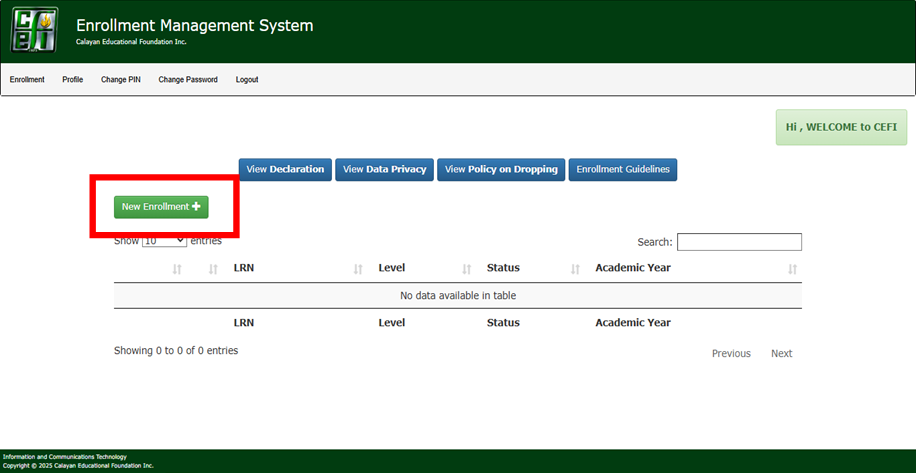
STEP 1. Log in to EMS using your credentials.
- To create an enrollment ledger, click on the NEW ENROLLMENT
Step 2: Your enrollment ledger will be checked within 1-2 business days. Once status is “CHECKED” you may proceed with the payment.
Payment Options:
Option 1: Over the Counter (KAT Ground Floor)
Note: Payment will be immediately reflected in the Enrollment Management System (EMS).
Option 2: Online Payment using the DRAGON PAY.
- Login to your account, click action then pay with dragon pay.
Note: Payments will be reflected on the same day if received on or before 4 p.m. during business hours. Payments received after 4 p.m. and weekends will be processed the next business day.
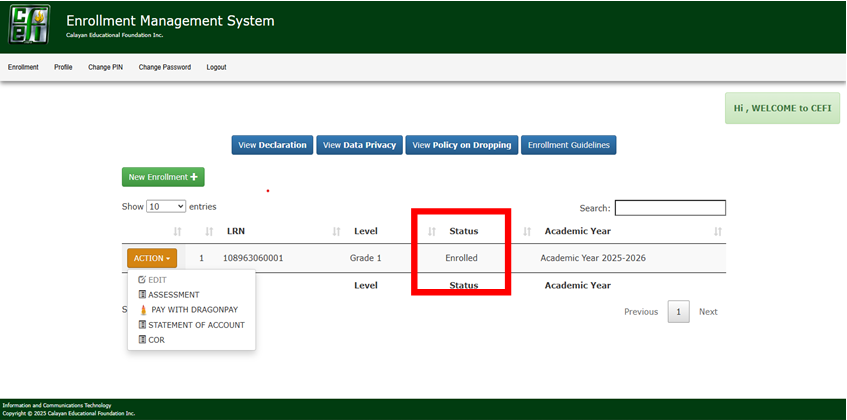
STEP 3: Check your enrollment status at the portal. It should display ENROLLED.
To print a copy of your Assessment, Statement of Account, and Certificate of Enrollment (COE):
- Click the Action
- Choose the document you want to print.
- Click Print.